What are typographic symbols?
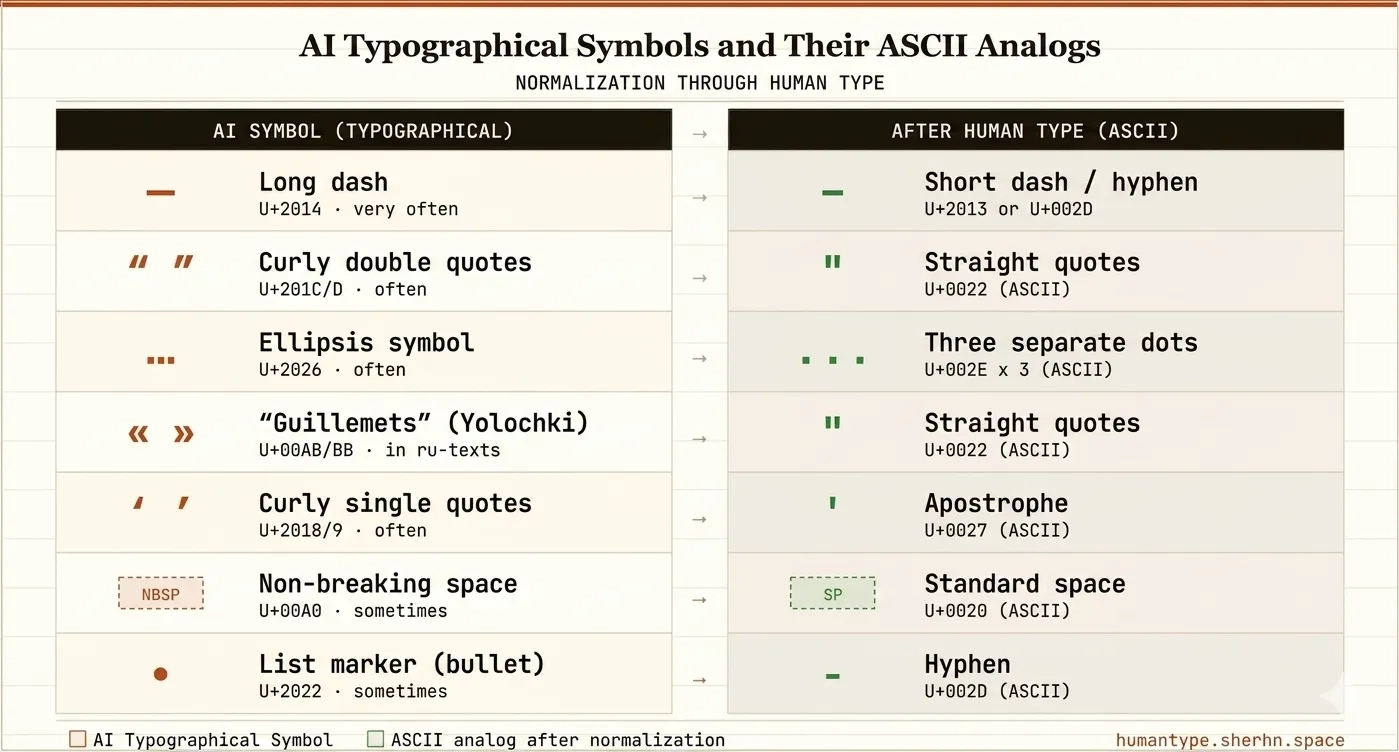
Typographic symbols are special Unicode characters that go beyond basic ASCII. They include em dashes (—), curly quotes (“ ”), the ellipsis character (…), non-breaking spaces, and dozens more. These symbols were designed to make text look polished in print and professional typesetting — but in the digital world, their presence can become an unintended signal when content is run through AI detection tools.
The distinction matters because AI detection algorithms do not just read text for meaning — they scan it character by character, looking for statistical patterns that distinguish machine-generated output from human typing. A professionally typeset book and an average person’s email sit at opposite ends of the typographic spectrum, and large language models tend to produce text that leans heavily toward the former.
Why does AI-generated text contain them?
Large language models (LLMs) like GPT-4, Claude, Gemini, and others are trained on vast corpora of professionally edited text — books, articles, and academic papers. These sources are rich in typographic symbols because they were originally formatted with professional typesetting tools. When an AI generates text, it replicates these formatting patterns, including the use of em dashes instead of hyphens, curly quotes instead of straight quotes, and the single-glyph ellipsis (…) instead of three dots (...).
For the AI, these are just tokens. The model does not know or care that — and - are visually different; it simply reproduces what it has seen during training. This is not a flaw in the model — it is a natural consequence of learning from high-quality editorial sources. But it creates a measurable typographic fingerprint that detectors can exploit.
Research into LLM output characteristics consistently shows that models trained on curated, professionally edited corpora tend to reproduce the typographic conventions of those corpora. This finding appears, among other places, in work on text provenance and stylometric analysis — fields that study how the origin of text can be inferred from its surface-level features. See, for example, overviews of stylometric detection methods discussed in the AI safety and NLP literature (e.g., surveys indexed in arXiv cs.CL from 2023 onward).
How AI detectors use typographic symbols
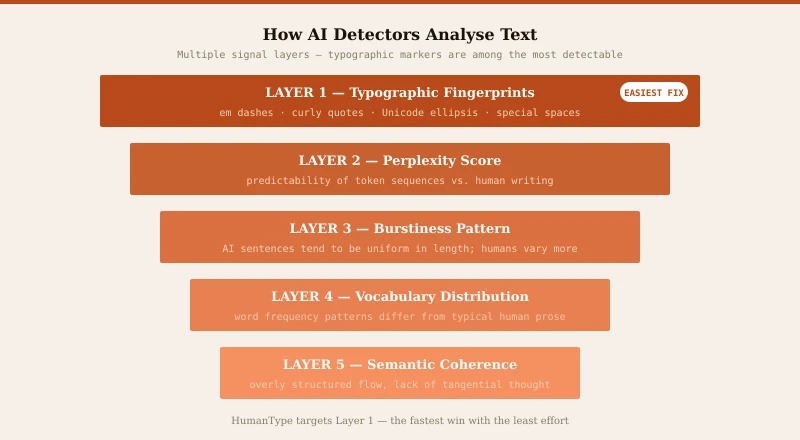
AI detection tools — including GPTZero, Originality.ai, and Turnitin’s AI detection — look at multiple signals: perplexity, burstiness, semantic patterns, and — critically — typographic fingerprints. The presence of certain Unicode characters is a statistically significant indicator that a text was machine-generated rather than human-typed.
Most humans do not know how to type an em dash. They use a hyphen (-) or a double hyphen (--). They do not insert a non-breaking space; they just hit the spacebar. They do not use the Unicode ellipsis; they type three periods. These small differences form a detectable pattern that AI detectors exploit.
What does HumanType replace?
HumanType applies 19 replacement rules across 7 categories:
- Dashes: Em dashes (—) at line starts become hyphens; inline em dashes become en dashes (–). Bullet points (•) become hyphens.
- Ellipsis: The single Unicode glyph (…) becomes three separate dots (...).
- Quotes: Curly single quotes (‘ ’), curly double quotes (“ ”), and guillemets (« ») become straight ASCII equivalents (' and ").
- Special spaces: Non-breaking space (U+00A0), thin space (U+2009), and hair space (U+200A) become regular spaces.
- Fractions & math: ½ → 1/2, ¼ → 1/4, ¾ → 3/4, × → *.
- Legal symbols: ® → (R), ™ → (TM), © → (c), † ‡ → *.
- Arrows: → ➔ → ->, ⇒ → =>, ← → <-, ⇐ → <=.
Symbol comparison table
The table below shows the most common AI typographic symbols, their Unicode code points, and the plain ASCII equivalents HumanType substitutes. All substitutions preserve meaning for human readers while removing the statistical marker.
| Symbol | Name | Unicode | AI text? | Replaced with | Detector signal? |
|---|---|---|---|---|---|
| — | Em dash | U+2014 | Very common | - or – | Strong |
| “ ” | Curly double quotes | U+201C/D | Common | " | Strong |
| … | Ellipsis glyph | U+2026 | Common | ... | Moderate |
| Non-breaking space | U+00A0 | Occasional | Space U+0020 | Moderate | |
| ‘ ’ | Curly single quotes | U+2018/9 | Common | ' | Moderate |
| • | Bullet point | U+2022 | Occasional | - | Weak |
| ® ™ | Legal symbols | U+00AE/2122 | Rare | (R) (TM) | Weak |
| ½ ¼ | Fraction glyphs | U+00BD/BC | Rare | 1/2, 1/4 | Weak |
Real-world case study
A graduate student submits a 600-word literature review draft to Turnitin. The text, generated with the help of an LLM, contains around a dozen em dashes, several curly-quote pairs, and multiple single-glyph ellipses — a typical density for AI-assisted academic prose.
After running the text through HumanType with all categories active, every typographic character is replaced with its plain ASCII equivalent in under a second. The structural content, the argument, and every sentence remain unchanged. The student then reviews and edits the text for voice and accuracy before submitting.
Note: results from AI detection tools vary by document, version, and configuration. Typographic normalization reduces one class of signals; it does not guarantee any specific outcome from any specific detector.
Does this affect readability?
No. The replacements are designed to preserve meaning while changing only the underlying character codes. An en dash (–) looks almost identical to an em dash (—) to a human reader but carries a different statistical signature. Three dots (...) read the same as the ellipsis glyph (…). The text remains fully readable and professional.
In fact, plain ASCII punctuation is often preferred in digital contexts: it renders consistently across all devices, email clients, and content management systems without any risk of encoding issues. Many style guides for web content explicitly recommend straight quotes and hyphen-based dashes precisely for this reason.
Is this enough to bypass AI detection?
Typographic normalization alone is not a silver bullet. Sophisticated AI detectors also analyze sentence structure, vocabulary distribution, and semantic coherence. However, removing typographic “tells” is a critical first step that reduces several detection signals simultaneously. Combined with other humanization techniques — varying sentence length, adding minor imperfections, injecting personal voice — it meaningfully improves the odds of passing AI detection.
Think of it in layers: typographic fingerprints sit at the surface of AI-generated text and are the fastest to address. Deeper signals like perplexity and burstiness require more involved editing. Starting with typographic normalization clears the most visible markers before you invest time in deeper revision. Read our full breakdown of AI detection signals.
Privacy and security
HumanType runs entirely in your browser. No text is ever sent to a server. The JavaScript code processes everything locally, so your content remains completely private and secure. There are no analytics, no tracking, and no data collection of any kind.
This architecture also means HumanType works offline once the page has loaded, is not subject to server outages, and introduces no latency from network round-trips. For anyone handling sensitive drafts — legal documents, internal reports, personal writing — the local-only model is the most private option available.
Step-by-step: using HumanType
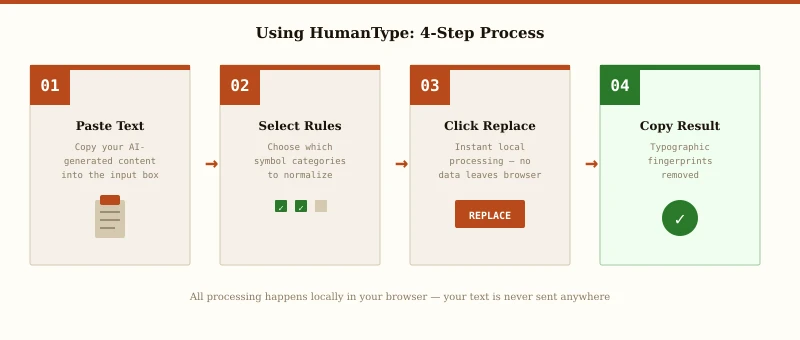
- Step 1 Paste your text into the input field on the main page.
- Step 2 Select replacement rules — choose categories to replace or leave all active for maximum normalization.
- Step 3 Click Replace — processing happens instantly in your browser.
- Step 4 Copy the result and use it wherever you need it.